2019年4月3日星期三

Dye Ink VS Pigment Ink, Which One Is Your Best Choice

Most inkjet printers use dye inks, but some photographers prefer pigment ink for a variety of reasons. Let's talk about the advantages of them and which one is better for digital printer.
Dye-based VS Pigment-based Ink: Let's Know the Difference of Them
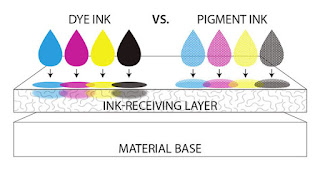
Dye Ink VS Pigment Ink


What is dye-based ink?

Dye-based ink uses colour substances that are dissolved in a liquid while pigmented ink uses small colour particles that are held in a suspension. The water soluble dye can be seen as sugar that dissolves in water and the pigments as sand mixed in water.


What is pigmented ink?

 Dye Ink
 Dye Ink
Pigments are dry, powdery crystals that must be mixed with a liquid before being applied to paper. Like industrial printing ink, pigment dyes are typically oil-based for their water- and fade-resistant properties, especially good on slick surfaces like transparencies and glossy brochures. Pigment dye printers apply a layer of color that lies on top of the page instead of being absorbed into the paper. After the pigment particles and solution mix coats the paper, the printer uses a combination of heat and pressure to evaporate the liquid and permanently attach the pigment to the paper.


The pros about dye-based Inks:

  • It has been around longer than pigment-based inks.
  • Because of its age, dye-based ink is more affordable.
  • Dyes have a wider color range and accuracy of color, and are the standard ink type used in most inkjet printers.
  • Printers that utilize it will produce prints more vibrantly, pictures tend to look more realistic then pigmented inks.

The pros about pigmented Inks:

  • This inks are pigments of color that are ground down very finely and then suspended inside a liquid in order to create ink.
  • It will most likely last longer.
  • The colors are stored inside the pigments, acting like a barrier to external forces like evaporation or oxidation.
  • The preservation of color is the main advantage.
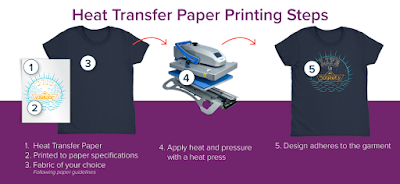
So after going by all the characteristics and differences in the inks, it is advised to use Pigmented ink for heat transfer paper. The reason for using a pigment ink over the regular dye ink is that the pigment ink doesn't fade quickly. It can also resist humidity and can be used for printing on the T-shirts using the right heat transfer paper. There are heat machines available that allow to press the pigment on the T-shirt using a heat transfer paper.


Which one is your best choice?

Each printer you buy will be able to hold a specific type of ink and so it is important that you do not use pigmented inks in dye based ink printers and vice versa. You should only use printer cartridges that contain the ink type that is specified in your printer document.
If longevity is the most important factor that you look for, pigment-based inks are the better option for you. However if you need printouts that display brilliant colors, dye based inks are the better option (and the option that you will find in most color inkjet printers today). If you are only printing in black and white, you may find that the other benefits offered by pigmented inks make them the best choice, and so you should make sure that your black ink cartridge contains pigment based ink when purchasing.
The type that you ultimately choose will depend on the type of printer that you own and the type of printing that you plan on doing.


More Info:
Website: www.skyimagepaper.com
Company Name: Fei Yue Digital Technology Co.,LTD
E-mail: sales@feiyuepaper.com
Tel: 86-025-86628894
Whatsapp: +86 15007920742
Address: Central Road 323, Nanjing, Jiangsu, China

Sublimation Printing and Heat Press Printing,The Difference Between of Them

There are two major printing:sublimation printing and heat transfer printing,but do you know the differences of them? Here are some of their concepts to make you understand them better.

What is Sublimation Transfer Printing?

 The Popular Industry and Consumer Response to Sublimation Printing
Sublimation Printing
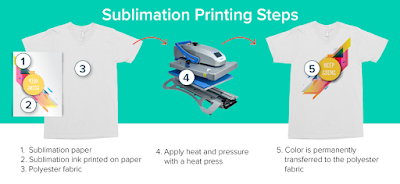
Sublimation transfer printing, also referred to as dye sublimation transfer printing, is a printing method for transferring images onto a substrate (usually a cloth material such as polyester). Sublimation refers to a process where a substance moves from a solid to a gas state without ever being in a liquid state. Sublimation transfer printing normally involves the use of a digital printer to produce mirrored images on paper that has been specially coated with a transfer material.

What is Heat Transfer Printing?


 The Process of Sublimation Heat Transfer Printing
Heat Transfer Printing
Heat-transfer printing, also referred to as thermal printing, thermal-transfer printing and thermal-wax transfer, uses heat to transfer an image from wax to an object. Thermal-based printing methods work with pre-printed images on a single wax sheet or produce printed-on-the-fly images made by layering wax dye onto an object.


The Differences of Two Printing


1.Prints made by the sublimation technique, have permanent and realistic images which are having soft feelings on hands. When you use the heat transfer technique, heat is transformed through the light based paper and sticks on the fabric.
2.The sublimation method uses the sublimation ink, while the heat transfer method uses pigment ink, dye ink, solvent ink, etc.
3.Though the heat transfer technology can be applied to all types of materials, mostly it works perfectly for the 100% cotton fabric. While the sublimation technology is widely used for polyester, banner, and hard surface like a mug, aluminum pot, etc. kinds of materials.
4.The sublimation transfer printing uses less pressure and temperature than the heat transfer method & prints in less than 1 minute of time.
5.The objects with textile sublimation transfer printing have permanent, high-resolution printings which do not peel, while the prints through the heat transfer process are having some different appearance than the surrounding fabric.
6.The dye sublimation transfer printing machine has easy setup process and also has a low cost of maintenance.
7.A dye sublimation printer has a longer lifespan than the heat transfer printing machines


More Info:

Website: www.skyimagepaper.com
Company Name: Fei Yue Digital Technology Co.,LTD
E-mail: sales@feiyuepaper.com
Tel: 86-025-86628894
Whatsapp: +86 15007920742
Address: Central Road 323, Nanjing, Jiangsu, China
2019年2月17日星期日

Does Using the Compatible or Remanufactured Cartridge will Affect Inkjet Priner Warranty?

Hello, nice to see you again, my dear friends! If you have one set sublimation printer, you may face to the problem of change the ink cartridge. Today, let's we learn this topic clearly. Now, please read the following, I will share you more.
You can carry on reading if you like, but if your printer is under warranty from the manufacturer or retailer, and your compatible/remanufactured cartridges are under warranty from us, then you are covered for all eventualities involving manufacturing faults or defects in either the printer or the cartridges.

BUT MY WARRANTY SAYS I CAN'T USE COMPATIBLE CARTRIDGES
It probably doesn't if you read it carefully. There are a number of laws and regulations that prevent manufacturers from witholding warranty cover because you've chosen a different brand of consumables - it would be seen as an illegal attempt to restrict customer choice. Printer manufacturers know this, and will do their best to persuade you to buy their own products, sometimes up to the point of implying a potential warranty issue, but they won't actually break the law.
You may see a phrase something along the lines of:
"We recommend that you use only original cartridges as we are not able to cover under warranty any damage or fault arising from the use of third party products"
The key words here are "arising from the use of", which means that the printer manufacturer would have to provide proof that the cartridges had damaged the printer before they could decide not to honour the warranty.
WHY DOES THE PRINTER MANUFACTURER RECOMMEND THEIR OWN CARTRIDGES?
It's a simple case of recovering costs. Designing and developing a new printer model costs a lot of money, and it's very difficult to get this back and end up in the black when selling the hardware in a competitive market. The established business model for printers has them cheap to purchase and expensive to run - it's not unusual for a manufacturer to make a loss on the printer itself and make all of the profit on the ink. Of course, if you buy compatible cartridges, none of that money goes back to the manufacturer.
IF YOUR PRINTER BREAKS DOWN
If your printer develops a fault for any reason, your first port of call should be the retailer you purchased it from, or the manufacturer directly. If the printer is under warranty then they will be obliged to either repair or replace it, or give you a reason for declining to do so.
In the extremely unlikely event of a warranty being refused because you've used compatible or remanufactured cartridges that you've purchased from us, just ask for a copy of the evidence (they must provide this on request) and send it to us - we'll make sure you're covered.
Okay, these all above are my share about the questions of using the compatible or remanufactured ink cartridges whether affect your printer warranty or not. If you have any other needs or questions welcome to contact us at any time. We will provide you the best quality product and service. Hope my article can be useful to you. Thank you for your reading.

2019年1月27日星期日

The Clear Guide Help You To Choose High-quality Wide-format Sublimation Printer

Hello, nice to see you again, my dear friends. Are you looking for one high quality large format sublimation printer? Do you know how to choose? There are some guide for you, hope it can help you.
The Best Large Format Printer
Specialty jobs such as large format printing are usually sent to copy shops. However, if you often print banners, blueprints or other documents over two feet wide, investing in a wide-format printer or plotter can be a good choice. Such machines are capable of printing in color, or black and white. It can handle a wide range of materials, in widths of 24" to 60" or more. This article presents some of the things that must be considered when deciding on the best kind of large format printer that will work for you and the task at hand.

QUALITY
The first thing any user must consider is the quality of the output. This goes hand-in-hand with the performance of the printer. One good advice is to find a name that you can trust. Don't buy used printers from companies that no longer exist. You will later realize that you can't get service, parts, or anyone who knows how to get them running again. Also, no new drivers or Raster Image Processors (RIP) are made for them.
The brand that you select can have a big impact on your overall satisfaction with your wide-format printer. Before making a decision there are several important considerations to be made. Service and support are among the most important. Whether you need a service technician to come out and repair a mechanical problem, or just have a question you need answered, the support offered by your chosen brand becomes valuable.

SPEED
All printers slow down to achieve higher quality prints. The corollary is that high-speed throughput occurs only when you lower the quality substantially. In other words, if you buy a printer for its photo-realistic capability, you do not get this quality at the faster production speeds. Most printers have banding at high speeds (one pass and two pass printing does not allow the printhead to interweave and cover the printhead path lines). To do photo-quality printing you need at least 4 passes while 6 and 8 passes are preferable.

MAINTENANCE
To ensure the efficient operation of your printer, most companies offer a wide range services from onsite support to participation in online user forums. With these services you can maintain the high productivity of your printing operation. Three basic services that you must look for are:
Warranty Services
These services are designed to cover your basic service and support needs, ensuring your printers' reliability and productivity.

Repair Services
These services offer a variety of enhanced support options that help to ensure the high performance of your printers and the high quality of their output.
Installation and Maintenance Services
These services offer a variety of ways to help you with the initial setup and ongoing maintenance of your printer.

Okay, if you still want to choose one high quality wide format inkjet printer, welcome to contact Skyimage. We are Chinese sublimation paper manuifacturer, also dealer of sublimation ink, printer and heat press, etc. If you have any other needs or questions welcome to contact us at any time. We will provide you the best quality product and service. Hope my article can be useful to you. Thank you for your reading.

2019年1月22日星期二

Epson DX5 Printhead VS Ricoh Gen5 Nozzle, What's the Difference of Them?

Hello, nice to see you again, my dear friends! Today, let's we talk about the print head of digital inkjet printers. There are different type printer nozzle, such as Epson DX5, DX6, DX7 nozzle and industrial Ricoh Gen5 printhead. Some one often ask me what the difference of them. Please read the following, Today I will share you the difference of epson DX5 and Ricoh Gen5 nozzle.

Getting the right printer head can be critical to reliable, cost effective and high-quality printing. For several years, the Epson DX5 printhead has been the most commonly used type on the market, and the Ricoh Gen 5 printhead often used in industrial printing.
Specifications
The DX5 is distinguished by its 8 rows of nozzles, with each row having 180 nozzles, for a total of 1440 nozzles, matched to a 1440dpi resolution. The Ricoh Gen5 features just 4 rows of nozzles, but each row has 320 nozzles for a total of 1280 nozzles. This is less than the DX5, however, as the Gen5 head is around 20% smaller, the dpi resolution is very similar between the two.
The smallest drop from the DX5 is 5pl, however for the Ricoh it’s a slightly larger 7pl, which could make a difference in very fine work. The Ricoh is designed to give 100 billion actuations per nozzle, and this shows where the design is focused, and that is longevity.


Performance
One area of difference is the number of channels these heads support, with 8 rows, the DX5 supports 8 separate channels, which could be used for 8 different colors, however the Ricoh Gen5 can only use a maximum of 4 channels and 4 colors due to its 4-row construction choice.
With a jetting frequency of 60 kHz, the Ricoh is much faster than the 8 kHz of the Epson head, and while it is slightly smaller and has less nozzles, it is the faster of the two, however the speed difference is not as noticeable as with some other comparisons.
Conclusion
While on the surface they seem quite evenly matched, the Ricoh does have one area where it has a significant advantage, and that is in longevity. Designed for 100 billion actuations per nozzle, the Gen5 is designed to last. Here it definitely shows a much better performance than the Epson, and because pricing between the two is very similar, will offer a less costly option over the longer term.
For high volume applications, the Ricoh Gen5 printhead is an obvious choice, although for those who really need more than 4 channels, then the Epson still delivers speed and quality to meet any needs.

Okay, If you want to know more about Epson DX5 and Ricoh Gen5 printhead, welcome to contact us at any time. We will provide you the best quality product and service. Hope my article can be useful to you. Thank you for your reading.

More Info:
Company Name: Fei Yue Digital Technology Co.,LTD
E-mail: sales@feiyuepaper.com
Tel: 86-025-86628894
Address: Central Road 323, Nanjing, Jiangsu, China

2019年1月14日星期一

How to Avoid Epson Printhead Damage When Install to Digital Inkjet Printer?

Hello, nice to see you again, my dear friends. Have you remember last article? Last week in last article, we talk about the roll to roll heat transfer machine. And today, let we talk one new topic, it about how to avoid Epson printhead damage when install to digital inkjet printer? Reading and following, I will share you more!

As we know, the print head corresponds to a printer is the most important part. And normally a print head also cost much if damaged accidentally. So we need to be cautious when installing a new sublimation printer.

There are five notes, you should pay attention to when install Epson nozzle into your inkjet printer
1. When replacing the installation nozzle, the printer should be shut down in a power-off state, and the static electricity on the hand should be eliminated in advance.

2. The nozzle is the core component of the printer. Handle it gently to avoid bumping. Do not touch the surface and circuit of the nozzle during installation.

3. When installing and connecting the nozzle to the data cable, please pay attention to the front and back. Make sure that the metal part of the data line is exactly connected with the metal point at the nozzle slot. Make sure that it is not tilted or loose after insertion.

4. If the data cable is not inserted correctly, check the metal part of the data cable after pulling out. If there is any lifting or damage, you must replace the new data cable.

5. After the nozzle is installed, do not run the power. First, gently move the car to the left and right to confirm that the position of the nozzle is correctly installed. No card is touched. After confirming, push the car back to the ink pad and turn it on again.

If you need the print head, now you can find in our Skyimage. We offer Mimaki, Epson, Ro-land original/second-hand print head!

Skyimage is Chinese sublimation paper manuifacturer, also dealer of sublimation ink, large-format inkjet printer and heat press, etc. If you have any other needs or questions welcome to contact us at any time. We will provide you the best quality product and service. Hope my article can be useful to you. Thank you for your reading.
More Info:
Website: www.skyimagepaper.com
Company Name: Fei Yue Digital Technology Co.,LTD
E-mail: sales@feiyuepaper.com
Tel: 86-025-86628894
Whatsapp: +86 18755150383
Address: Central Road 323, Nanjing, Jiangsu, China

2019年1月1日星期二

What is the Difference Between a Single or Double Printhead Large-format Inkjet Printer?

In recent years, domestic digital printing machines have quickly occupied the domestic and international digital printing and printing equipment market with excellent value-for-money performance and affordable price, becoming the mainstream of printing equipment and the necessary equipment for digital printing. The development of domestic digital printing machines is constantly developing in the direction of multi-functional high-speed and wide-ranging. Under the environment of increasing user demand, different printing machine manufacturers and different brands are constantly introducing new products.

In different brands, different manufacturers and different functions of the large format inkjet printer, give users more freedom to choose, for example, digital printing machines that choose different functions for different industry applications, choose different printing width inkjet printers according to the needs of use Models, as well as different digital printing machines by ink type.

The variety of printing machines allows customers to pick their eyes, so when we buy, do we choose a single nozzle or a dual nozzle? What is the difference between them? Let Skyimage Digital tell you!
When customers choose inkjet printers, they often ask sales consultants, “Is it good to use a single-head inkjet printer or a dual-headjet printer? What is the difference between the two? How should I choose?” The current single-head inkjet printer (ie a piezoelectric nozzle) and the dual-jet inkjet printer (dual printhead) provide a simple understanding.

Single-head inkjet printers are the application of our traditional piezo inkjet printers. However, in recent years, many manufacturers have developed and introduced multi-nozzle inkjet printers in pursuit of faster printing speeds.
Piezoelectric inkjet printers use Epson's fifth-generation piezoelectric nozzles and 5113 nozzles. The 5113 nozzles have higher printing accuracy, faster printing speed, better droplet control technology, and better output images. The light is more refined and more beautiful, but Epson's fifth-generation nozzle has relatively good stability and long life. Therefore, since the piezo inkjet printer is aimed at users, it has been rapidly developed and welcomed by users.

The dual-head series piezoelectric inkjet printer adopts dual-nozzle simultaneous printing design. Compared with the single-head inkjet printer, it is simply a nozzle design, and the related ink supply system and ink stack and small frame. The related control boards, etc. are all different. The dual-header prints out at the same time. The speed is fast. The theoretical speed is 2 times. The single-head inkjet printer has the advantage of speed, even higher speed. At the same time, the price is double. The head is more expensive than a single-jet inkjet printer.
Some people think that the stability of the single-head inkjet printer and the single-head inkjet printer, the stability of the single head may be slightly higher than the double-head inkjet printer, after all, the single-head inkjet printer has many years of technical experience, related The nozzle control technology is relatively mature, the machine is very stable and easy to maintain.

If you are pursuing efficiency and speed, the dual-jet large format inkjet printer is your best choice. Many of our main machines are equipped with dual Epson DX5 printhead, 5113 high-precision micro-piezo nozzles, mature and stable technology to ensure high-quality operation of equipment. , let you achieve high precision and perfect printing.