显示标签为“wide format inkjet printer”的博文。显示所有博文

2019年8月18日星期日

Direct to garment and traditional digital printer,what are advantages of the former?

What are the advantages of direct to garment digital printer compared with traditional printers? Is it good for Chinese printer or imported printer?Is a fast printer better or a slow one? How about color fastness? Is direct to garment digital printer good or tradition printer?

1.Traditional direct to garment printer

(1).In the printing process, many processes such as color separation, film making, and net making, the cycle of traditional proofing is generally about one week.
 Direct to Garment Digital Printer
 Direct to Garment Digital Printer
(2).In the traditional printing, once the designer's sample is determined, it is a very tedious task to modify it again.
(3).The traditional printing and dyeing production of color and flower length limit, the textile design space expansion is small, the product grade is low.
(4).Traditional water color paste, high energy consumption, high pollution.
(5).It is difficult to guarantee the consistency of the fancy.

2.Nowadays - direct to garment printer

(1).Accept the diversity of the pattern printing method, everything can be done by computer.Generally, the proofing time does not exceed one working day.
(2).The design sample can be arbitrarily modified on the computer to fully display the designer's concept;
(3).Direct to garment printing machine uses 8 basic colors, (Quaternary color and dark blue, light red, light blue, orange).In theory, 16.77 million colors can be expressed, Especially on the printing of high-precision patterns such as color gradation. Digital printing has an unparalleled advantage in technology;
 DTG Printer
DTG Printer
(4).The use of dyes in the printing process by the computer "on-demand distribution" almost no waste of waste and the generation of wastewater, to achieve green production;
(5).The data of each color is automatically memorized by the computer, and the color data is unchanged during mass production.Ensure consistency between small samples and large samples, batches and batches.Really realize the production process of small batch and fast reaction, and the production batch is not subject to any restrictions.

3.The Advantages of direct to garment printer

(1). The printing process is very simple, only need to prepare a computer.An operator can perform the printing operation completely independently, saving manpower and material resources, and the method is simple, and it is desirable to stand.The experience of the operator is not high, just understand the simple image processing software.
(2). Strong adaptability, DTG printer adapt to the printing of a variety of
materials in the market.
(3). The speed of the sample board, you can see the effect within 10 minutes.
(4). Very suitable for picture printing with rich colors and gradient colors.


More Info:
Website: www.skyimagepaper.com
Company Name: Fei Yue Digital Technology Co.,LTD
E-mail: sales@feiyuepaper.com
Tel: 86-025-86628894
Whatsapp: +86 15007920742
Address: Central Road 323, Nanjing, Jiangsu, China

2019年6月11日星期二

UV printing machine vs universal printer,What is the difference between of them?

UV printing machine and universal printers are the two machines we usually use. Do you know the difference between them?

What are the advantages and disadvantages of these two machines?

1.Advantages of the universal printer:

(1). One-off printing, no plate making, no need for film, low cost, and small-volume product printing.
(2).Do not pick the material, print any material, and have good compatibility.
(3).Multi-color printing, no color registration, perfect color transition, amazing printing effect.
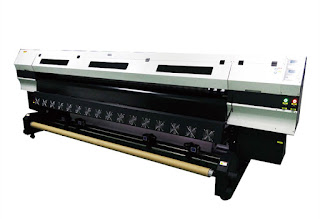
 UV Roll to Roll Printer
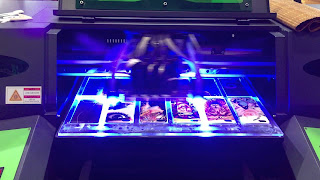
 UV Printing Machine
(4).three-dimensional product printing, this universal printing machine can print any product with a thickness of 17 cm.
(5).Fine, multi-color, special-shaped products are preferred for printing.
(6).Put the printed materials directly on the platform, you can print directly, just as the printer prints on paper is as convenient as possible.
(7).energy saving, flat panel printer only needs 220V voltage
(8).The material can print up to 15 cm in thickness, and the printing thickness can be adjusted freely (can be increased according to requirements)
(9).The platform of UV flatbed printer can withstand 50 kg material printing at a time
(10).All quantities of objects are printed successfully in one shot area
(11). uneven material (with an uneven depth of 5 mm) can be directly printed
(12).can perfectly reflect the hand-painted effect
(13).can perfectly reflect the transition color (gradient color)

2.Advantages of UV printers

(1). High color saturation and good color effect.
( 2).The print has high gloss and beautiful appearance. Matching with the matte background color, you can get an exciting visual contrast, which is very helpful for enhancing the high quality image of the product.
(3). It is suitable for many kinds of printed materials with different physical properties and chemical properties, including paper, cardboard, plastic, racetrack, PVC, PE, etc. This feature can print more product types than traditional lithography, and has a broader market future.
(4). It can be dried immediately at the same time of printing, which can greatly improve production efficiency. Since there is no need to wait for the ink drying time, the production time can be greatly shortened, and the printing company can save a lot of space for storing the to-be-printed parts, which is helpful for cost saving.
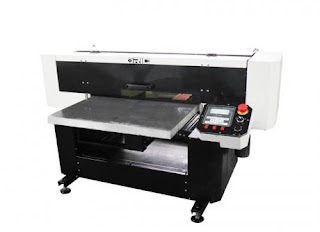
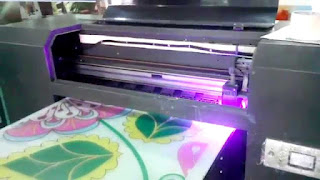
 UV Printer
 UV Printer
(5). Since it is dry immediately during printing, it is not necessary to use dusting, which can be avoided by improving the quality problems caused by dusting.
(6). Since it is dry immediately after printing, it can not be like the traditional lithographic printing, color change will occur within 48 hours of printing.
(7). The print is more resistant to light.
(8). The abrasion resistance of the print is better.
(9). More affinity for the environment

3.Disadvantages of UV printers compared to universal printers

Fast speed,the speed of the UV inkjet printer is 9-10 square meters per hour.The normal working speed of the universal printer is 3-4 square meters.

4.Disadvantages of UV printers compared to universal printers

(1) High barriers to entry: high machine prices, high maintenance costs, and UV ink prices are much higher than traditional inks.
(2) Long preparation time: As with the copier, it needs to be preheated, about 30 minutes, and it costs more.
(3) Printing media is not resistant to high temperature: it can't be blistered, and it will fall off easily after high temperature.
(4) Short print head life: Due to the long-term UV curing, it is inevitable that some light sources will reflect/refractive to the nozzles, and the nozzles will solidify together. It can only be replaced.
(5) There is a certain danger: UV light is harmful to human skin and eyes, and ozone generated by ultraviolet radiation is also harmful to the human body.
(6) As the temperature changes, the medium will expand and shrink, and it will fall off easily. For example: glass, ceramic tiles, etc.
(7) UV light curing can only reach about 75% at present, which means that although the surface is dry after the screen is finished, the actual internal is not completely dry, which also causes cracking and falling off after a period of time.
(8) In actual production, the printing speed of the machine will also affect the quality of UV curing.
(9) UV ink storage is inconvenient, because UV ink is easy to deteriorate after seeing light, and it cannot be used normally after curing.
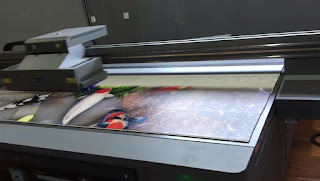
 UV Inkjet Printer
UV Inkjet Printer
(10) The accuracy of UV equipment is not enough, the highest is only 1440DPI, and the universal flatbed printer can reach 5760DPI.
(11) Large format UV printer cost and consumable cost are much cheaper than UV, especially when using UV mode nozzle is very expensive,it is not very cost-effective when making a single order.

More Info:
Website: www.skyimagepaper.com
Company Name: Fei Yue Digital Technology Co.,LTD
E-mail: sales@feiyuepaper.com
Tel: 86-025-86628894
Whatsapp: +86 15007920742
Address: Central Road 323, Nanjing, Jiangsu, China

2019年5月14日星期二

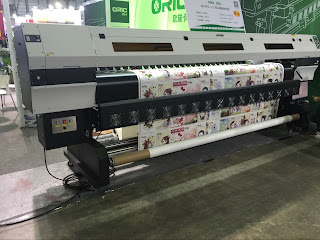
When Operating The Wide Format Inkjet Printer,Note The Following Issues

When you operate a wide format inkjet printer, do you know  what you should pay attention to and how to maintain the printer better.

1. Position the printer

 Epson Printer
Wide Format Inkjet Printer
Large format inkjet printer should be placed in a smooth horizontal plane, in order to avoid interference between peripheral equipment, have relatively independent work space, in order to avoid accidental collision to the printer, cause unnecessary damage: in addition, the location of the ink-jet printer and the location of the host computer and the power socket can't too far, because most of the inkjet printer still use the parallel port and connected to the PC host, if the location of the printer is not reasonable, can lead to large printer line stretching or distortion of signal line, once the signal lines disconnection or poor contact, will use the printer of trouble. Not too far from the power outlet, the fact is the same.

2. The printer tray must be fully opened

Printing must be completely pulled out of the tray, if the tray is not fully open, it will cause the lower half of the paper hanging, so that the paper can not enter the printer, often causing paper jam. But it will also make the print head empty, both a waste of ink and ink will fall off the printer, causing unnecessary damage to the printer.

3. Multiple sheets of paper should be printed at the same time

If the automatic paper feeding function of the printer is used and multiple sheets of paper are to be printed, be sure to shake the paper evenly and then put it into the paper, otherwise it will cause paper jam, paper defects and other problems.

4. Do not open the front panel for printing

 Oric TX1802 Sublimation Printer
Oric Inkjet Printer
Many impatient friends like to open the front panel of the printer, hand-painted paper for printing, in fact, this kind of printing is not desirable, because the printer printing speed is determined by its performance, which will not only speed up the printing speed, but also cause immeasurable damage to the print head.
In addition, when the front panel is opened, if one hand is forced to leave the front panel, on the one hand the front panel may be cracked; On the other hand, the printer also tilts to one side, thus affecting the quality of printing.

5. Must be dust proof

To prevent the entry of dust and other dirt, dirty printer nozzle, affecting the quality of printing. Do not use the printer. Cover the printer with a cloth to avoid dust. At the same time, we should also pay attention to the clean environment.

6. Prevent liquid inflow

Do not place any items on the digital inkjet printer, especially liquids or other small objects that may flow into the printer to avoid damaging its components.

7. You must turn off the power first

Before unplugging the power cord or signal cord, turn off the printer so that the printer can be re-inserted into the cartridge "cover" in case the ink gets stuck.

8. Install ink cartridges carefully

Since the cartridge tray is very accurate, care must be taken when handling the cartridge to avoid damage to the holder, so do not force the tray or cartridge.

9. Poor printing quality makes it impossible to clean the print head

 Oric UV Printer
Large Format Inkjet Printer
If there are striations in the printing, fading or the printing quality is obviously reduced, the printer can be equipped with the function of cleaning the printing head to get better printing effect.

10. Clean the printer with a soft cloth

If you want to clean the inkjet printing machine, you must use a clean soft cloth to wipe, do not let ethanol and other liquid liquid contact the printer surface and internal parts.

Pay attention to some details before and after the operation, so that your printer can be used for a longer time.

More Info:
Website: www.skyimagepaper.com
Company Name: Fei Yue Digital Technology Co.,LTD
E-mail: sales@feiyuepaper.com
Tel: 86-025-86628894
Whatsapp: +86 15007920742
Address: Central Road 323, Nanjing, Jiangsu, China

2019年5月10日星期五

Note! Your UV Inkjet Printer's Life Will Be Shortened By Following Ignored Operations.

When we use a UV inkjet printer, the printer's life is shortened because of some improper operation, which reduces the life of the printer. Please pay attention to the following problems during operation.


1. Force adjustment of the print head.

 Oric UV Hybrid Printer
UV Inkjet Printer
Do not use external force to adjust nozzle position without adjustment. Do not use brute force when changing or slightly adjusting the nozzle. Please follow the instructions carefully.


2. Ignore the working ground line.

UV flatbed printers are very subject to static electricity. It is necessary to check the ground connection regularly and sprinkle a little salt water on the ground.


3. Soak the nozzle for cleaning.

Although it is more effective to put the nozzle into the cleaning solution for a long time to remove stains, the cleaning solution is somewhat corrosive, and if the time is longer than 48 hours, the nozzle itself will be affected. Therefore, it is generally only necessary to clean the print head at an appropriate time.


4. Cleaning without turn off the power.

Protect the circuit board and other internal systems, and turn off the power supply when cleaning. Do not touch the circuit board and other internal systems.


5. Use non-inspection cleaning fluid.

Clean the nozzle with a dirty liquid solution. Print head nozzles are very prone to contamination and wear, so use manufacturer specified products and quality inspection cleaning products to clean the nozzles.


6. High-pressure cleaning nozzle

If the nozzle is slightly blocked, it is recommended to use a vacuum cleaner to remove the dust, and then carry out fine cleaning, do not use high-pressure cleaning nozzle.


7. Random switching circuit.

Install and remove the UV roll to roll printer circuit, do not turn off the power. This behavior can damage the life of each system and endanger the nozzle.


8. Ultrasonic cleaning nozzle.

Do not use the ultrasonic cleaning machine to clean the nozzle for a long time.
 Oric OF6045 UV Flatbed Printer With DX5 Head
UV printer
In fact, if you usually pay attention to the maintenance of the nozzle, there is no need for ultrasonic cleaning. Ultrasonic waves can adversely affect the nozzle. But if the blockage is severe, ultrasonic cleaning is required, and the cleaning time can be as long as 3 minutes. If not, wait for the nozzle to cool to its normal state. The condition during a second cleaning.

9. Mix ink randomly.

Do not raise the ink of different lot at will, or use inferior ink, clean fluid. Mixing two different configurations of ink can change the color and quality of the ink, affect the printing effect and clog the nozzle.

When using a large format UV printing machine, be sure to pay attention to the above problems. Although it is easy to be ignored, it will also affect your printer.


More Info:
Website: www.skyimagepaper.com
Company Name: Fei Yue Digital Technology Co.,LTD
E-mail: sales@feiyuepaper.com
Tel: 86-025-86628894
Whatsapp: +86 15007920742
Address: Central Road 323, Nanjing, Jiangsu, China
2019年1月27日星期日

The Clear Guide Help You To Choose High-quality Wide-format Sublimation Printer

Hello, nice to see you again, my dear friends. Are you looking for one high quality large format sublimation printer? Do you know how to choose? There are some guide for you, hope it can help you.
The Best Large Format Printer
Specialty jobs such as large format printing are usually sent to copy shops. However, if you often print banners, blueprints or other documents over two feet wide, investing in a wide-format printer or plotter can be a good choice. Such machines are capable of printing in color, or black and white. It can handle a wide range of materials, in widths of 24" to 60" or more. This article presents some of the things that must be considered when deciding on the best kind of large format printer that will work for you and the task at hand.

QUALITY
The first thing any user must consider is the quality of the output. This goes hand-in-hand with the performance of the printer. One good advice is to find a name that you can trust. Don't buy used printers from companies that no longer exist. You will later realize that you can't get service, parts, or anyone who knows how to get them running again. Also, no new drivers or Raster Image Processors (RIP) are made for them.
The brand that you select can have a big impact on your overall satisfaction with your wide-format printer. Before making a decision there are several important considerations to be made. Service and support are among the most important. Whether you need a service technician to come out and repair a mechanical problem, or just have a question you need answered, the support offered by your chosen brand becomes valuable.

SPEED
All printers slow down to achieve higher quality prints. The corollary is that high-speed throughput occurs only when you lower the quality substantially. In other words, if you buy a printer for its photo-realistic capability, you do not get this quality at the faster production speeds. Most printers have banding at high speeds (one pass and two pass printing does not allow the printhead to interweave and cover the printhead path lines). To do photo-quality printing you need at least 4 passes while 6 and 8 passes are preferable.

MAINTENANCE
To ensure the efficient operation of your printer, most companies offer a wide range services from onsite support to participation in online user forums. With these services you can maintain the high productivity of your printing operation. Three basic services that you must look for are:
Warranty Services
These services are designed to cover your basic service and support needs, ensuring your printers' reliability and productivity.

Repair Services
These services offer a variety of enhanced support options that help to ensure the high performance of your printers and the high quality of their output.
Installation and Maintenance Services
These services offer a variety of ways to help you with the initial setup and ongoing maintenance of your printer.

Okay, if you still want to choose one high quality wide format inkjet printer, welcome to contact Skyimage. We are Chinese sublimation paper manuifacturer, also dealer of sublimation ink, printer and heat press, etc. If you have any other needs or questions welcome to contact us at any time. We will provide you the best quality product and service. Hope my article can be useful to you. Thank you for your reading.