显示标签为“large format uv printer”的博文。显示所有博文

2019年9月17日星期二

How to ensure uv printer nozzles can be used for a long time

The UV printer head is very important. If there is a problem with the print head, the printer will strike and cannot be used for production. The nozzle is a high-precision part that may be damaged or clogged due to your slight inattention. The flatbed printer nozzle is composed of a large number of small nozzles. The size of the nozzle is similar to that of the granular dust. If some small debris or dust enters the nozzle, it will clog and the nozzle panel will be stained with ink, resulting in the phenomenon of ink ejection. Therefore, the maintenance and maintenance of the nozzle is very necessary.

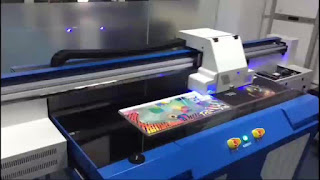
 UV Printer
 UV Printer
The nozzles removed from the UV flatbed printer cannot be placed separately, especially at high and low temperatures. If the removed nozzle is left for a long time, the dry ink will clog the nozzle as the moisture contained in the residual ink in the nozzle gradually evaporates. If the nozzle is found to be clogged, the nozzle should be cleaned immediately. If the nozzle is still not used after the cleaning is completed, it is necessary to consider whether the nozzle is broken. If it is broken, replace the nozzle with a new one.
Do not touch the surface of the UV inkjet printer nozzle with tools and fingers, in case of damage to the surface of the nozzle or oil, debris blocking the nozzle. Do not blow air toward the nozzle, and do not put oil, sweat, or alcohol on the nozzle, which will cause the composition of the ink and viscosity changes, resulting in an ink condensation block. Also do not use tissue paper, lens paper, cloth, etc. to wipe the nozzle surface.

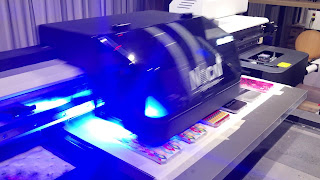
 Inkjet UV Printer
 Inkjet UV Printer
Do not suddenly turn off the power while the UV printing machine is working. If some models of printers are suddenly turned off, the printer will not be able to perform a cap operation on the nozzles, causing the nozzles to be exposed to air and the ink to dry up, causing the nozzles to become clogged. The correct way is to turn the UV flatbed printer to the OFFLINE state after the nozzle is capped, turn off the power, and finally unplug the plug.

Wide-format UV inkjet printer nozzles are high-precision equipment, and the price is still very expensive on the market. In daily use, it is necessary to pay more attention to the maintenance of the nozzles, and master some tips for using the nozzles, so as to make the nozzle use longer, to save time and money to work production.

More Info:
Website: http://www.sublimationstar.com
Company Name: Fei Yue Digital Technology Co., LTD
E-mail: frida@feiyuepaper.com
Tel: 86-025-86628894
Whatsapp: +86 15007920742
Address: Central Road 323, Nanjing, Jiangsu, China

2019年6月27日星期四

After the uv inkjet printer nozzle is blocked, how to clear it?

During the use of uv inkjet printers, improper operation sometimes causes nozzle clogging, which affects printing efficiency and causes unnecessary loss. Because the nozzles are not cleaned in time, the uv printer nozzle clogging damage will be further increased. Several nozzle cleaning methods, I hope to help everyone.

The first type: the scope of application of the immersion method: the resistance is lighter

Step 1: 

Prepare a small flat plate, place the nozzle flat in the tray, and then inject the special cleaning solution for the uv flatbed printer into the tray. The depth is just to immerse the nozzle part. Be careful not to splash water on the cable plug and drive. On the board, the first soaking time is about one hour.

Step 2: Cleaning

 UV Inkjet Printer
 UV Inkjet Printer
1. Gently suck the water stain on the nozzle with a damp cloth. Do not wipe the nozzle at the bottom of the nozzle.
2. Repeat the process for all nozzles to be cleaned. Use a clean area for the cloth for each nozzle.
3. If the nozzle is clogged, the distilled water can be slightly heated and placed in a small amount on the plate. When the nozzle is placed on the plate, the water surface should not leak higher than the bottom 2CM because the water may leak to the back of the chip.
4. Stand the nozzle upright in warm water. Wait for 30 seconds, then test the nozzle after sucking dry.
5. Each nozzle should be cleaned with clean water.

The second type: nozzle injection flushing method Scope of application: severely blocked.

Tools: 95% alcohol, a clean cup, a syringe, and an infusion set.
Working principle: Using the pressure generated by the siphon action of the syringe, an organic solvent such as alcohol is injected into the print head to clean the dry ink head.
Use a plastic tube of the infusion set, one end is inserted in the 5ml syringe, the other end is inserted into the nozzle ink inlet of the nozzle to be flushed, and the distilled water in the syringe is pressed into the nozzle, so that the pressure is not too large, so as to prevent the water pressure from squeezing the nozzle Internal waterproofing adhesive. This process needs to be repeated several times until it is seen that each of the ink outlets ejects a fine water column. In this way, the blocked nozzle is completely cleaned.

The third type: ultrasonic instrument cleaning method Scope of application: the situation is very serious

 UV Printing Machine
UV Printing Machine
Working principle; the ultrasonic cleaning machine is used to generate strong ultrasonic waves, so that the water molecules vibrate violently, and the fine dry ink particles are shattered and dissolved in water to achieve the purpose of cleaning.
The reminder here is that if the uv printing machine nozzle is blocked, stop printing immediately, and check the degree of blockage. If you can't clean it yourself, please contact the uv printer manufacturer to help solve it. Do not blindly disassemble the nozzle.

More Info:
Website: www.skyimagepaper.com
Company Name: Fei Yue Digital Technology Co.,LTD
E-mail: sales@feiyuepaper.com
Tel: 86-025-86628894
Whatsapp: +86 15007920742
Address: Central Road 323, Nanjing, Jiangsu, China

2019年6月19日星期三

Large format uv flatbed printing machine What is the uncoated of it?

What is the uncoated of large format UV flatbed printers? what is the benefit? These three are problems that plague new users. If you can't understand the difference well, it is easy to cause a lot of troubles for the use of late devices. Seriously, you may buy equipment that you can't use at all, and you will waste money.
 Large Format UV Flatbed Printing machine
 Large Format UV Flatbed Printing machine
The uncoated UV flatbed printer means that when printing part of the material, printing can be started without pre-pressing the surface of the material. It does not mean that all materials can be printed without coating. This coating-free printing is conditional.For example, the surface of the plastic material can be free of coating, and it is common to have a mobile phone case, a notebook case, and the like. Gypsum ceilings commonly found in building materials can also be printed without coating; however, some can not be printed without coating, such as glass, glazed tiles, metal, etc. Any surface density is high, smooth materials can not be directly printed.
So how is the coating free? The free coating is actually determined by the ink. The UV ink itself contains corrosiveness. In this process, the pigment component in the ink can adhere to the surface of the material to realize the entire printing process.Everyone who prints knows that printing something like glass, tile, or metal can't be printed directly. If you need to do some coating treatment on the material to print, then let's first talk about the benefits of using the coating:

1. The drying speed

The fast processing liquid is prepared by special chemical materials, and it is dried in about three minutes after spraying, especially in the smooth materials such as glass, porcelain and metal.

2.The printing quality is better

 UV Printer
 UV Printer
If it is directly printed on some materials, it is mainly smooth and non-absorbent material, the effect is poor, and the effect is remarkable after using the treatment liquid. No matter whether the material is bent or folded for a long time, there will be no cracking or faulting on the surface of the material.

3.Wear resistance, waterproof

Since the composition of the treatment liquid has adhesive components, the adsorption force of the ink and the material after printing is very superior, far exceeding the wear resistance of the untreated state, and the waterproofness of the material after using the treatment liquid is far more than that. The coating state is many times.
Customers who have used uv flatbed printing machine know that 90% of the materials used to print glass, ceramics, metal, leather, etc. must be coated. Because the weak solvent ink directly prints the pattern, there is a great possibility that the ink is piled up and the printing and printing effect is poor. Must do pre-printing.

More Info:
Website: www.skyimagepaper.com
Company Name: Fei Yue Digital Technology Co.,LTD
E-mail: sales@feiyuepaper.com
Tel: 86-025-86628894
Whatsapp: +86 15007920742
Address: Central Road 323, Nanjing, Jiangsu, China

2019年6月17日星期一

Why uv printer suddenly crashed druing work and how to solve it?

As a digital brushing device, uv printers will inevitably have small faults in operation. The size of the fault determines the service life of the machine. If a machine has a problem at two ends in three days, then the stability of the machine is not good enough. It can even be said that the manufacturer's technology is not in place and the quality of the product is not good. Today I will solve the common glitch of the uv machine and the solution to the uv printing machine crash.
 UV Printer
 UV Printer
The uv printing machine crash is that the machine stops printing during the printing process and the software is out of control. In general, the crash can be divided into two types, one is a complete crash, that is, the uv inkjet printer and software all stop working; the other is a non-complete crash, mainly in the machine rail is running, but no ink, the printing process is interrupted.

The reason and solution for the uv inkjet printer crash:


1.External interference

Such as data transmission, computer configuration, USB cable, etc. will indirectly cause the tile background wall printer to crash, most of these cases are printing software crashes. Environmental problems can also cause certain interference. For example, if the air around the work is too dry and the static electricity is too large, it will cause the printer to freeze.

2.The printing software has failed

Printing fails, just like an application failure, we need to uninstall the existing printing software and reinstall it. You can try to reboot before reinstalling the printing software. If the printing software restarts and still freezes, it is recommended to reinstall. If the data is severely damaged, it is recommended to reinstall the computer system.

3.The machine itself is faulty

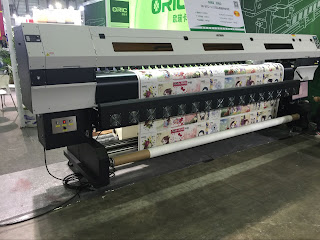
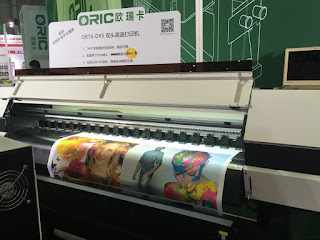
 Oric UV1803-G5 UV Roll To Roll Printer
UV Printing Machine
The head of the uv inkjet printer is composed of guide rails and sliders. If the machine is used for a long time, it will inevitably wear out and malfunction. Customers are advised to check the rails, sliders, belts, screw rods and other accessories to ensure the integrity of the hardware.

Failure of the internal circuit system of the nozzle can also cause a crash. Internal circuit board failure is mainly caused by internal circuit damage or board burnout. Under normal circumstances, new machines are less likely to have such problems. Most of them are faults that occur when the machine is used for half a year or more. This part of the fault can be avoided in the usual maintenance.
If the large format uv printer crashes and the software factor is removed, it is recommended to immediately power off and contact the after-sales engineer for processing.

More Info:
Website: www.skyimagepaper.com
Company Name: Fei Yue Digital Technology Co.,LTD
E-mail: sales@feiyuepaper.com
Tel: 86-025-86628894
Whatsapp: +86 15007920742
Address: Central Road 323, Nanjing, Jiangsu, China

2019年6月14日星期五

UV flatbed printer,How to distinguish whether it is second-hand or new printer

When we are ready to buy a uv flatbed printer, we must judge whether it is a new printer. If you spend money of new machine to buy an old printer, it will be too bad. Here are a few ways to share with you.

1. Date code.

Open the base of the UV inkjet printer nozzle and observe the internal accessories. Generally, there are date codes on the top. If the date of each component is very different, then the uv flatbed printer has been used for some time, and it has also been replaced by many components.

2. refurbished code

 Oric UF2513 / UF2030 UV Flatbed Printer With Ricoh Gen5 Print Heads.
UV Flatbed Printer
The code posted on the print head is the same as the code on the software board. If it is not the same, then the uv printer is second-hand or refurbished. Because the new machine is absolutely the same.

3. Nozzle difference

The effect of the new print head printing is relatively poor when compared to the unused nozzles, because the nozzles will be better and better after a period of use. So when the two nozzles are compared together, you can pay attention. There is also the old nozzle, especially the nozzle that specializes in white ink. Be sure to pay attention to whether the nozzle passage is burnt out and whether the nozzle is blocked.

4. Whether the ink has traces of use

You can check the ink path, the ink tube, and the ink near the nozzle. If there is a description, the nozzle is used.

5. Head parts

 UV Printer
UV Printer
The simple method is to look at the old and new parts of the UV flatbed printing machine head parts, open the head of the uv flatbed printing machine, observe the internal parts, the second-hand basic can be seen by the naked eye is old.
The above is a few ways to give some laymen a simple but not uv flatbed printing machine is a second-hand printer, I do not know if it will help you. In addition to the above methods, there may be better, you can also try. Thanks for browsing! Leave a message for me.

More Info:
Website: www.skyimagepaper.com
Company Name: Fei Yue Digital Technology Co.,LTD
E-mail: sales@feiyuepaper.com
Tel: 86-025-86628894
Whatsapp: +86 15007920742
Address: Central Road 323, Nanjing, Jiangsu, China

2019年6月12日星期三

If the uv printer printed image is too dark,what should I do?

I don't know if you have such an experience? When you use the uv printer to print patterns, you will find that in some cases, when printing certain materials, the pattern will be particularly dark and will not achieve the desired effect. So what is the problem, and what should we do? In fact, you can try this method, which is to increase the angle of the curve behind the color software, and the specific value of the rising angle needs to be debugged by the technician according to the color condition of the customer pattern, and as long as the standard is met.
 UV Flatbed Printer
 UV Flatbed Printer
So why does the image suddenly fade when the uv flatbed printer prints? Let's talk about some of the reasons that have arisen.
First of all, the amount of ink set in the grade may be relatively low. Generally, in the image control software of the uv printer, the ink output may have different options such as 40%, 60%, 80%, and 100%. Sometimes, some inexperienced people may make mistakes in the original normal ink output, which will make the printed image fade. In this case, we only need to increase the amount of ink.
Then there are different materials that may have an effect on the printing effect. Each material has different gloss, transparency, smoothness, etc. Some materials have a dissolution effect on the ink, and some materials have an adsorption effect, and these characteristics will be The printed effect has a certain effect, and some will make the output image fade or darken.
 UV Printer
 UV Printer
The last thing I know is that the printed PASS is too low.Generally, on objects with small materials, we can use high pass printing, which will make the printed colors full and clear. Print large format patterns and print with a lower pass. Therefore, it can be adjusted according to the pass when printing, so that the printed pattern is not difficult.
Finally, I hope that the print will be carefully handled when using uv inkjet printer, and try not to make some low-level mistakes.


More Info:
Website: www.skyimagepaper.com
Company Name: Fei Yue Digital Technology Co.,LTD
E-mail: sales@feiyuepaper.com
Tel: 86-025-86628894
Whatsapp: +86 15007920742
Address: Central Road 323, Nanjing, Jiangsu, China

2019年6月11日星期二

UV printing machine vs universal printer,What is the difference between of them?

UV printing machine and universal printers are the two machines we usually use. Do you know the difference between them?

What are the advantages and disadvantages of these two machines?

1.Advantages of the universal printer:

(1). One-off printing, no plate making, no need for film, low cost, and small-volume product printing.
(2).Do not pick the material, print any material, and have good compatibility.
(3).Multi-color printing, no color registration, perfect color transition, amazing printing effect.
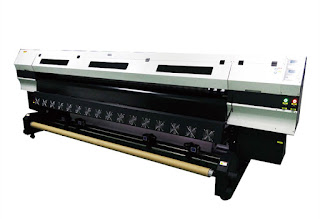
 UV Roll to Roll Printer
 UV Printing Machine
(4).three-dimensional product printing, this universal printing machine can print any product with a thickness of 17 cm.
(5).Fine, multi-color, special-shaped products are preferred for printing.
(6).Put the printed materials directly on the platform, you can print directly, just as the printer prints on paper is as convenient as possible.
(7).energy saving, flat panel printer only needs 220V voltage
(8).The material can print up to 15 cm in thickness, and the printing thickness can be adjusted freely (can be increased according to requirements)
(9).The platform of UV flatbed printer can withstand 50 kg material printing at a time
(10).All quantities of objects are printed successfully in one shot area
(11). uneven material (with an uneven depth of 5 mm) can be directly printed
(12).can perfectly reflect the hand-painted effect
(13).can perfectly reflect the transition color (gradient color)

2.Advantages of UV printers

(1). High color saturation and good color effect.
( 2).The print has high gloss and beautiful appearance. Matching with the matte background color, you can get an exciting visual contrast, which is very helpful for enhancing the high quality image of the product.
(3). It is suitable for many kinds of printed materials with different physical properties and chemical properties, including paper, cardboard, plastic, racetrack, PVC, PE, etc. This feature can print more product types than traditional lithography, and has a broader market future.
(4). It can be dried immediately at the same time of printing, which can greatly improve production efficiency. Since there is no need to wait for the ink drying time, the production time can be greatly shortened, and the printing company can save a lot of space for storing the to-be-printed parts, which is helpful for cost saving.
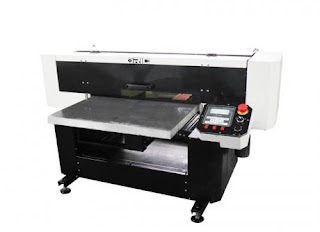
 UV Printer
 UV Printer
(5). Since it is dry immediately during printing, it is not necessary to use dusting, which can be avoided by improving the quality problems caused by dusting.
(6). Since it is dry immediately after printing, it can not be like the traditional lithographic printing, color change will occur within 48 hours of printing.
(7). The print is more resistant to light.
(8). The abrasion resistance of the print is better.
(9). More affinity for the environment

3.Disadvantages of UV printers compared to universal printers

Fast speed,the speed of the UV inkjet printer is 9-10 square meters per hour.The normal working speed of the universal printer is 3-4 square meters.

4.Disadvantages of UV printers compared to universal printers

(1) High barriers to entry: high machine prices, high maintenance costs, and UV ink prices are much higher than traditional inks.
(2) Long preparation time: As with the copier, it needs to be preheated, about 30 minutes, and it costs more.
(3) Printing media is not resistant to high temperature: it can't be blistered, and it will fall off easily after high temperature.
(4) Short print head life: Due to the long-term UV curing, it is inevitable that some light sources will reflect/refractive to the nozzles, and the nozzles will solidify together. It can only be replaced.
(5) There is a certain danger: UV light is harmful to human skin and eyes, and ozone generated by ultraviolet radiation is also harmful to the human body.
(6) As the temperature changes, the medium will expand and shrink, and it will fall off easily. For example: glass, ceramic tiles, etc.
(7) UV light curing can only reach about 75% at present, which means that although the surface is dry after the screen is finished, the actual internal is not completely dry, which also causes cracking and falling off after a period of time.
(8) In actual production, the printing speed of the machine will also affect the quality of UV curing.
(9) UV ink storage is inconvenient, because UV ink is easy to deteriorate after seeing light, and it cannot be used normally after curing.
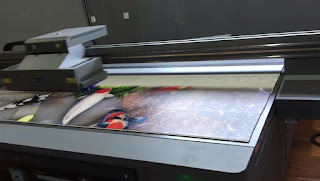
 UV Inkjet Printer
UV Inkjet Printer
(10) The accuracy of UV equipment is not enough, the highest is only 1440DPI, and the universal flatbed printer can reach 5760DPI.
(11) Large format UV printer cost and consumable cost are much cheaper than UV, especially when using UV mode nozzle is very expensive,it is not very cost-effective when making a single order.

More Info:
Website: www.skyimagepaper.com
Company Name: Fei Yue Digital Technology Co.,LTD
E-mail: sales@feiyuepaper.com
Tel: 86-025-86628894
Whatsapp: +86 15007920742
Address: Central Road 323, Nanjing, Jiangsu, China

2019年5月5日星期日

UV Flatbed Printing Machine Coating, Six Methods to Verify That It Is Qualified

When we buy UV flatbed printing machine coatings, we often worry about buying bad quality. Poor quality coatings will not only affect the print quality, but also damage your printer.


1. The adhesion
 UV Printer
UV Printer

There are many ways to measure the adhesion, such as 100 grid method. If the printing product quality requirements are high, you can also test the printed product immersion or boiled inkjet screen is off or not. Adhesion is the key to measuring the quality of a UV flatbed printer's coating. High-quality coatings should pass the 100-grid test and should not peel off after soaking or boiling water.


2. The leveling

Leveling is a common paint performance indicators, refers to the ability the coating of UV flatbed printer appears brush marks and spray fogging when paint brushing or spraying on the surface of the object. Poor flatness UV PRINTER coating will affect the decorative effect of the print. More importantly, if the brush marks on the coating surface do not disappear automatically, the uneven coating surface may rub the large format UV printer nozzle, causing significant damage. High-quality coating should be formulated closely, level quickly after brushing or spraying.


3. The transparency of the film

As a high value-added decorative products, UV PRINT appearance requirements are generally high. This requires UV flatbed coating film colorless, transparent. Now on the market there are some epoxy resin-based two-component coatings will be yellowing, which it will affect the decorative effect.
 Oric UF2513 / UF2030 UV Flatbed Printer With Ricoh Gen5 Print Heads.
UV Flatbed Printing Machine


4. Weather ability

UV printing products, especially signs, billboards, prints in outdoors must be long-term bright as new, do not fade. Specifically, It requires UV flatbed printer coatings to resist ultraviolet light. Some coatings now yellow under long-term light conditions and are not suitable for outdoor use. Even for UV-printed products that are only used indoors, there is a general need to consider the use of weather-resistant UV plate printer coatings to ensure product quality.

5. The ease of use 

Currently on the market UV coating two-component and multi-component products, relative to the multi-component products, no need to configure the single component UV flatbed inkjet coating in the use of more Big advantage.


6. Product safety

This is a problem that must be considered. Solvent-based coating of UV flatbed inkjet printer is not only smelling, but also caused by the improper storage of security risks, transportation is not convenient. Because of the high investment in UV flatbed inkjet printers, it is best to consider safer aqueous UV coatings when choosing a coating. If solvent-based coatings must be used, it is recommended that they be stored separately from the UV flatbed digital printer to eliminate potential safety issues.
 Oric 1.6m UV Roll To Roll And Faltbed All-In-One Printer With Double DX5 Print Heads
UV Flatbed Printer

According to the above method to judge and buy a good quality coating, this will save you a lot of trouble.

More Info:
Website: www.skyimagepaper.com
Company Name: Fei Yue Digital Technology Co.,LTD
E-mail: sales@feiyuepaper.com
Tel: 86-025-86628894
Whatsapp: +86 15007920742
Address: Central Road 323, Nanjing, Jiangsu, China